
Pharmacy checkout built around counter work.
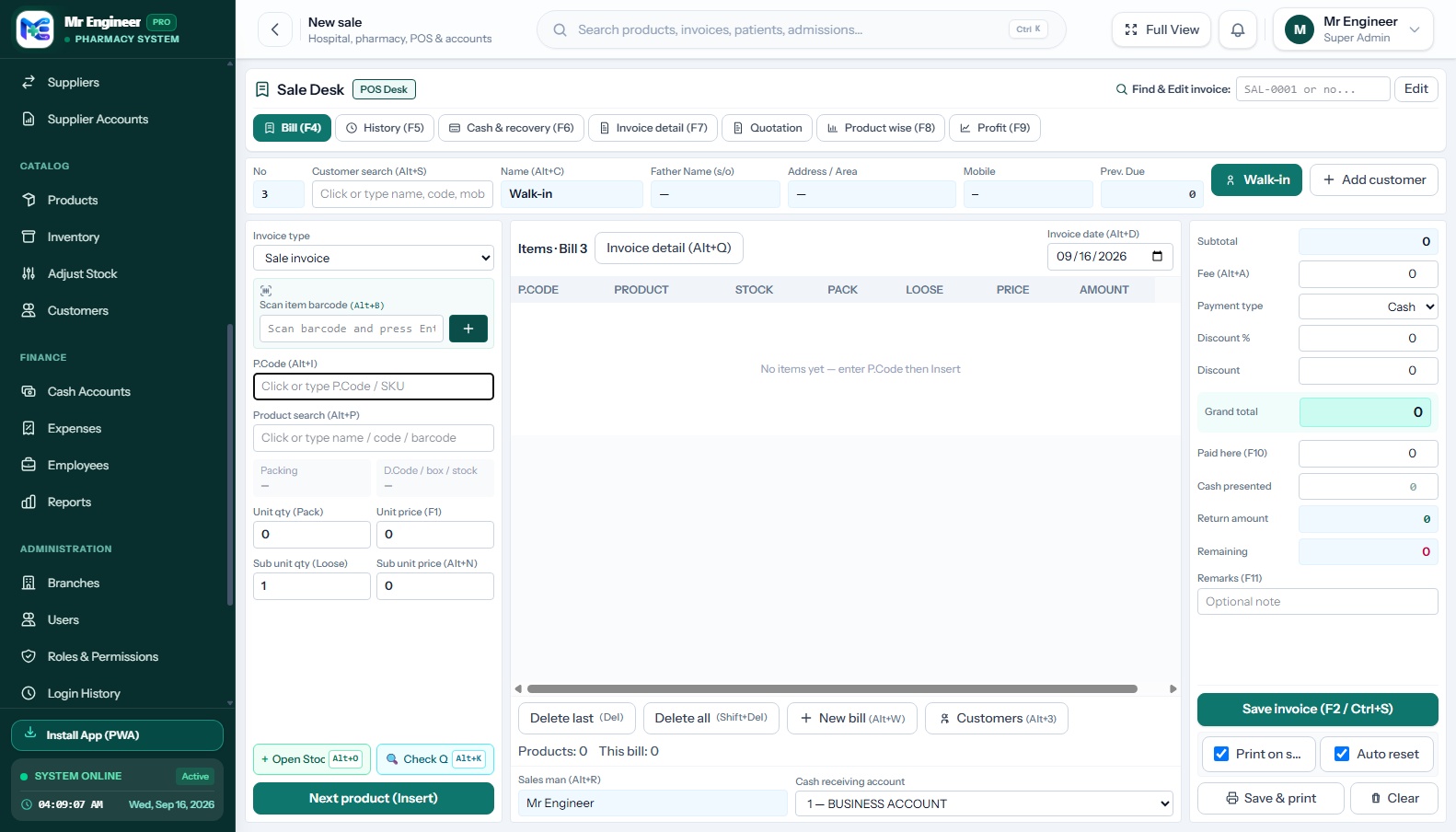
Search products, scan barcodes and handle whole packs or loose units from a focused sales desk. Keep the sale, stock movement and customer payment connected.
Find the right item
Search by product trade name, internal P-Code or scan manufacturer EAN barcodes. Instantly verify batch availability and unit pricing before adding to cart.
Work through the sale
Use keyboard shortcuts for common counter actions. Enter box packs and loose blister units side-by-side, apply authorized discounts, and tender cash.
Finish and follow up
Save invoices with optional immediate ESC/POS thermal printing (80mm/58mm), review transaction history across shifts, and process customer item returns.
Mr. Engineer Sale Desk Interface
Actual unmodified capture of `/sales/create`
Keyboard-focused counter shortcuts
Eliminate mouse dependency during peak retail hours with native hotkeys.
Quick Actions & Modals
- Alt + O Quick Add Product & Stock
- Alt + K / F3 Check Medicine Stock Quantity
- Alt + S Focus Customer Phone / Name
- Alt + B Focus Barcode Scanner Field
- Insert Add Selected Item Row to Cart
- Shift + Delete Prompt to Clear Entire Cart
Function Key Controls
- F2 / Ctrl + S Save Sale (No mandatory print)
- F4 Bill Entry Tab
- F5 Customer History Tab
- F6 Customer Credit Recovery Tab
- F10 Focus Cash Tendered / Paid
- F12 / Ctrl+Shift+P Save Sale & Trigger Thermal Print
Hardware Compatibility Note
Receipt printer and barcode scanner behavior depends on the supported device, operating system, browser, and configured print workflow (e.g. 80mm vs 58mm ESC/POS thermal printers). We invite you to share your hardware models during your demo walkthrough so we can verify exact setup requirements.